mirror of
https://github.com/bolucat/Archive.git
synced 2026-04-23 00:17:16 +08:00
 github-action[bot]
332 lines
14 KiB
Markdown
332 lines
14 KiB
Markdown
[](https://github.com/nilaoda/BBDown) [](https://github.com/nilaoda/BBDown) [](https://github.com/nilaoda/BBDown/releases) [](https://github.com/nilaoda/BBDown) [](https://github.com/nilaoda/BBDown/actions/workflows/build_latest.yml)
|
||
|
||
> 本项目仅供个人学习、研究和非商业性用途。用户在使用本工具时,需自行确保遵守相关法律法规,特别是与版权相关的法律条款。开发者不对因使用本工具而产生的任何版权纠纷或法律责任承担责任。请用户在使用时谨慎,确保其行为合法合规,并仅在有合法授权的情况下使用相关内容。
|
||
|
||
# BBDown
|
||
一个命令行式哔哩哔哩下载器. Bilibili Downloader.
|
||
|
||
# 注意
|
||
本软件混流时需要外部程序:
|
||
|
||
* 普通视频:[ffmpeg](https://www.gyan.dev/ffmpeg/builds/) ,或 [mp4box](https://gpac.wp.imt.fr/downloads/)
|
||
* 杜比视界:ffmpeg5.0以上或新版mp4box.
|
||
|
||
# 快速开始
|
||
本软件已经以 [Dotnet Tool](https://www.nuget.org/packages/BBDown/) 形式发布
|
||
|
||
如果你本地有dotnet环境,使用如下命令即可安装使用
|
||
```
|
||
dotnet tool install --global BBDown
|
||
```
|
||
|
||
如果需要更新bbdown,使用如下命令
|
||
```
|
||
dotnet tool update --global BBDown
|
||
```
|
||
|
||
# 下载
|
||
Release版本:https://github.com/nilaoda/BBDown/releases
|
||
|
||
自动构建的测试版本:https://github.com/nilaoda/BBDown/actions
|
||
|
||
# 开始使用
|
||
目前命令行参数支持情况
|
||
```
|
||
Description:
|
||
BBDown是一个免费且便捷高效的哔哩哔哩下载/解析软件.
|
||
|
||
Usage:
|
||
BBDown <url> [command] [options]
|
||
|
||
Arguments:
|
||
<url> 视频地址 或 av|bv|BV|ep|ss
|
||
|
||
Options:
|
||
-tv, --use-tv-api 使用TV端解析模式
|
||
-app, --use-app-api 使用APP端解析模式
|
||
-intl, --use-intl-api 使用国际版(东南亚视频)解析模式
|
||
--use-mp4box 使用MP4Box来混流
|
||
-e, --encoding-priority <encoding-priority> 视频编码的选择优先级, 用逗号分割 例: "hevc,av1,avc"
|
||
-q, --dfn-priority <dfn-priority> 画质优先级,用逗号分隔 例: "8K 超高清, 1080P 高码率, HDR 真彩, 杜比视界"
|
||
-info, --only-show-info 仅解析而不进行下载
|
||
--show-all 展示所有分P标题
|
||
-aria2, --use-aria2c 调用aria2c进行下载(你需要自行准备好二进制可执行文件)
|
||
-ia, --interactive 交互式选择清晰度
|
||
-hs, --hide-streams 不要显示所有可用音视频流
|
||
-mt, --multi-thread 使用多线程下载(默认开启)
|
||
--video-only 仅下载视频
|
||
--audio-only 仅下载音频
|
||
--danmaku-only 仅下载弹幕
|
||
--sub-only 仅下载字幕
|
||
--cover-only 仅下载封面
|
||
--debug 输出调试日志
|
||
--skip-mux 跳过混流步骤
|
||
--skip-subtitle 跳过字幕下载
|
||
--skip-cover 跳过封面下载
|
||
--force-http 下载音视频时强制使用HTTP协议替换HTTPS(默认开启)
|
||
-dd, --download-danmaku 下载弹幕
|
||
--skip-ai 跳过AI字幕下载(默认开启)
|
||
--video-ascending 视频升序(最小体积优先)
|
||
--audio-ascending 音频升序(最小体积优先)
|
||
--allow-pcdn 不替换PCDN域名, 仅在正常情况与--upos-host均无法下载时使用
|
||
-F, --file-pattern <file-pattern> 使用内置变量自定义单P存储文件名:
|
||
|
||
<videoTitle>: 视频主标题
|
||
<pageNumber>: 视频分P序号
|
||
<pageNumberWithZero>: 视频分P序号(前缀补零)
|
||
<pageTitle>: 视频分P标题
|
||
<bvid>: 视频BV号
|
||
<aid>: 视频aid
|
||
<cid>: 视频cid
|
||
<dfn>: 视频清晰度
|
||
<res>: 视频分辨率
|
||
<fps>: 视频帧率
|
||
<videoCodecs>: 视频编码
|
||
<videoBandwidth>: 视频码率
|
||
<audioCodecs>: 音频编码
|
||
<audioBandwidth>: 音频码率
|
||
<ownerName>: 上传者名称
|
||
<ownerMid>: 上传者mid
|
||
<publishDate>: 收藏夹/番剧/合集发布时间
|
||
<videoDate>: 视频发布时间(分p视频发布时间与<publishDate>相同)
|
||
<apiType>: API类型(TV/APP/INTL/WEB)
|
||
|
||
默认为: <videoTitle>
|
||
-M, --multi-file-pattern <multi-file-pattern> 使用内置变量自定义多P存储文件名:
|
||
|
||
默认为: <videoTitle>/[P<pageNumberWithZero>]<pageTitle>
|
||
-p, --select-page <select-page> 选择指定分p或分p范围: (-p 8 或 -p 1,2 或 -p 3-5 或 -p ALL 或 -p LAST 或 -p 3,5,LATEST)
|
||
--language <language> 设置混流的音频语言(代码), 如chi, jpn等
|
||
-ua, --user-agent <user-agent> 指定user-agent, 否则使用随机user-agent
|
||
-c, --cookie <cookie> 设置字符串cookie用以下载网页接口的会员内容
|
||
-token, --access-token <access-token> 设置access_token用以下载TV/APP接口的会员内容
|
||
--aria2c-args <aria2c-args> 调用aria2c的附加参数(默认参数包含"-x16 -s16 -j16 -k 5M", 使用时注意字符串转义)
|
||
--work-dir <work-dir> 设置程序的工作目录
|
||
--ffmpeg-path <ffmpeg-path> 设置ffmpeg的路径
|
||
--mp4box-path <mp4box-path> 设置mp4box的路径
|
||
--aria2c-path <aria2c-path> 设置aria2c的路径
|
||
--upos-host <upos-host> 自定义upos服务器
|
||
--force-replace-host 强制替换下载服务器host(默认开启)
|
||
--save-archives-to-file 将下载过的视频记录到本地文件中, 用于后续跳过下载同个视频
|
||
--delay-per-page <delay-per-page> 设置下载合集分P之间的下载间隔时间(单位: 秒, 默认无间隔)
|
||
--host <host> 指定BiliPlus host(使用BiliPlus需要access_token, 不需要cookie, 解析服务器能够获取你账号的大部分权限!)
|
||
--ep-host <ep-host> 指定BiliPlus EP host(用于代理api.bilibili.com/pgc/view/web/season, 大部分解析服务器不支持代理该接口)
|
||
--tv-host <tv-host> 自定义tv端接口请求Host(用于代理api.snm0516.aisee.tv)
|
||
--area <area> (hk|tw|th) 使用BiliPlus时必选, 指定BiliPlus area
|
||
--config-file <config-file> 读取指定的BBDown本地配置文件(默认为: BBDown.config)
|
||
--version Show version information
|
||
-?, -h, --help Show help and usage information
|
||
|
||
|
||
Commands:
|
||
login 通过APP扫描二维码以登录您的WEB账号
|
||
logintv 通过APP扫描二维码以登录您的TV账号
|
||
serve 以服务器模式运行
|
||
```
|
||
|
||
# 功能
|
||
- [x] 番剧下载(Web|TV|App)
|
||
- [x] 课程下载(Web)
|
||
- [x] 普通内容下载(Web|TV|App)
|
||
- [x] 合集/列表/收藏夹/个人空间解析
|
||
- [x] 多分P自动下载
|
||
- [x] 选择指定分P进行下载
|
||
- [x] 选择指定清晰度进行下载
|
||
- [x] 下载外挂字幕并转换为srt格式
|
||
- [x] 自动合并音频+视频流+字幕流+**章节信息**`(使用ffmpeg或mp4box)`
|
||
- [x] 单独下载视频/音频/字幕
|
||
- [x] 二维码登录账号
|
||
- [x] 多线程下载
|
||
- [x] 支持调用aria2c下载
|
||
- [x] 支持AVC/HEVC/AV1编码
|
||
- [x] **支持8K/HDR/杜比视界/杜比全景声下载**
|
||
- [x] 自定义存储文件名
|
||
|
||
# TODO
|
||
- [ ] 自动刷新cookie
|
||
- [ ] 支持更多自定义选项
|
||
|
||
# 使用教程
|
||
|
||
<details>
|
||
<summary>配置文件 (NEW)</summary>
|
||
|
||
---
|
||
|
||
在`1.4.9`或更高版本中,BBDown支持读取本地配置文件以简化命令行的手动输入。
|
||
|
||
如果用户没有指定`--config-file`,则默认读取程序同目录下的`BBDown.config`文件;若用户指定,则读取特定文件。
|
||
|
||
一个典型的配置文件:
|
||
```config
|
||
#本文件是BBDown程序的配置文件
|
||
#以#开头的都会被程序忽略
|
||
#然后剩余非空白内容程序逐行读取,对于一个选项,其参数应当在下一行出现
|
||
|
||
#例如下面将设置输出文件名格式
|
||
--file-pattern
|
||
<videoTitle>[<dfn>]
|
||
|
||
--multi-file-pattern
|
||
<videoTitle>/[P<pageNumberWithZero>]<pageTitle>[<dfn>]
|
||
|
||
#下面设置下载多个分P时,每个分P的下载间隔为2秒
|
||
--delay-per-page
|
||
2
|
||
|
||
#开启弹幕下载功能
|
||
--download-danmaku
|
||
```
|
||
|
||
</details>
|
||
|
||
<details>
|
||
<summary>自定义输出文件名格式 (NEW)</summary>
|
||
|
||
---
|
||
|
||
在`1.4.9`或更高版本中,BBDown支持用户自定义合并时的文件名组成。
|
||
| 代码 | 含义 |
|
||
| ---- | ---- |
|
||
`<videoTitle>`|视频主标题
|
||
`<pageNumber>`|视频分P序号
|
||
`<pageNumberWithZero>`|视频分P序号(前缀补零)
|
||
`<pageTitle>`|视频分P标题
|
||
`<bvid>`|视频BV号
|
||
`<aid>`|视频aid
|
||
`<cid>`|视频cid
|
||
`<dfn>`|视频清晰度
|
||
`<res>`|视频分辨率
|
||
`<fps>`|视频帧率
|
||
`<videoCodecs>`|视频编码
|
||
`<videoBandwidth>`|视频码率
|
||
`<audioCodecs>`|音频编码
|
||
`<audioBandwidth>`|音频码率
|
||
`<ownerName>`|上传者名称(下载番剧时,该值为"")
|
||
`<ownerMid>`|上传者mid(下载番剧时,该值为"")
|
||
`<publishDate>`|发布时间(yyyy-MM-dd_HH-mm-ss)
|
||
`<apiType>`|API类型(TV/APP/INTL/WEB)
|
||
|
||
</details>
|
||
|
||
<details>
|
||
<summary>WEB/TV鉴权</summary>
|
||
|
||
---
|
||
|
||
扫码登录网页账号:
|
||
```
|
||
BBDown login
|
||
```
|
||
然后按照提示操作
|
||
|
||
扫码登录云视听小电视账号:
|
||
```
|
||
BBDown logintv
|
||
```
|
||
然后按照提示操作
|
||
|
||
*PS: 如果登录报错`The type initializer for 'Gdip' threw an exception`,请参考 [#37](https://github.com/nilaoda/BBDown/issues/37) 解决*
|
||
|
||
手动加载网页cookie:
|
||
```
|
||
BBDown -c "SESSDATA=******" "https://www.bilibili.com/video/BV1qt4y1X7TW"
|
||
```
|
||
手动加载云视听小电视token:
|
||
```
|
||
BBDown -tv -token "******" "https://www.bilibili.com/video/BV1qt4y1X7TW"
|
||
```
|
||
|
||
</details>
|
||
|
||
<details>
|
||
<summary>APP鉴权</summary>
|
||
|
||
---
|
||
|
||
> 根据 [#123](https://github.com/nilaoda/BBDown/issues/123#issuecomment-877583825) ,可以填写TV登录产生的`access_token`来给APP接口使用。可复制`BBDownTV.data`到`BBDownApp.data`使程序自动读取.
|
||
|
||
目前程序无法自动获取鉴权信息,推荐通过**抓包**来获取.
|
||
|
||
在请求Header中寻找键为`authorization`的项,其值形为`identify_v1 5227************1`,其中的`5227************1`就是token(access_key)
|
||
|
||
获取后手动通过`-token`命令加载, 或写入`BBDownApp.data`使程序自动读取.
|
||
|
||
```
|
||
BBDown -app -token "******" "https://www.bilibili.com/video/BV1qt4y1X7TW"
|
||
```
|
||
|
||
</details>
|
||
|
||
<details>
|
||
<summary>常用命令</summary>
|
||
|
||
---
|
||
|
||
下载普通视频:
|
||
```
|
||
BBDown "https://www.bilibili.com/video/BV1qt4y1X7TW"
|
||
```
|
||
使用TV接口下载(粉丝量大的UP主基本上是无水印片源):
|
||
```
|
||
BBDown -tv "https://www.bilibili.com/video/BV1qt4y1X7TW"
|
||
```
|
||
当分P过多时,默认会隐藏展示全部的分P信息,你可以使用如下命令来显示所有每一个分P。
|
||
```
|
||
BBDown --show-all "https://www.bilibili.com/video/BV1At41167aj"
|
||
```
|
||
选择下载某些分P的三种情况:
|
||
* 单个分P:10
|
||
```
|
||
BBDown "https://www.bilibili.com/video/BV1At41167aj?p=10"
|
||
BBDown -p 10 "https://www.bilibili.com/video/BV1At41167aj"
|
||
```
|
||
* 多个分P:1,2,10
|
||
```
|
||
BBDown -p 1,2,10 "https://www.bilibili.com/video/BV1At41167aj"
|
||
```
|
||
* 范围分P:1-10
|
||
```
|
||
BBDown -p 1-10 "https://www.bilibili.com/video/BV1At41167aj"
|
||
```
|
||
下载番剧全集:
|
||
```
|
||
BBDown -p ALL "https://www.bilibili.com/bangumi/play/ss33073"
|
||
```
|
||
|
||
</details>
|
||
|
||
<details>
|
||
<summary>API服务器</summary>
|
||
|
||
启动服务器(自定义监听地址和端口):
|
||
|
||
```shell
|
||
BBDown serve -l http://0.0.0.0:12450
|
||
```
|
||
|
||
API服务器不支持HTTPS配置,如果有需要请自行使用nginx等反向代理进行配置
|
||
|
||
API详细请参考[json-api-doc.md](./json-api-doc.md)
|
||
</details>
|
||
|
||
# 演示
|
||
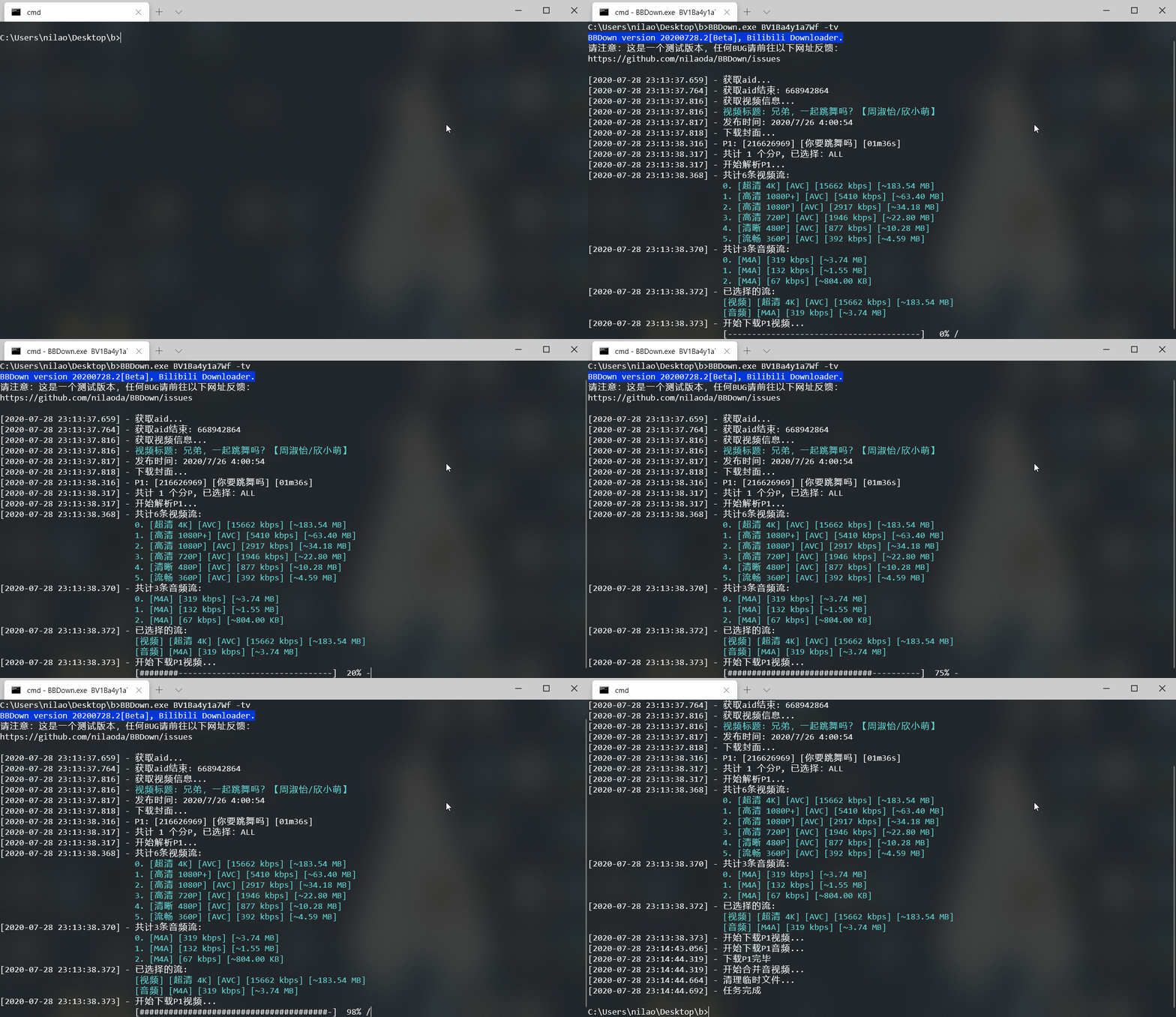
|
||
|
||
下载完毕后在当前目录查看MP4文件:
|
||
|
||
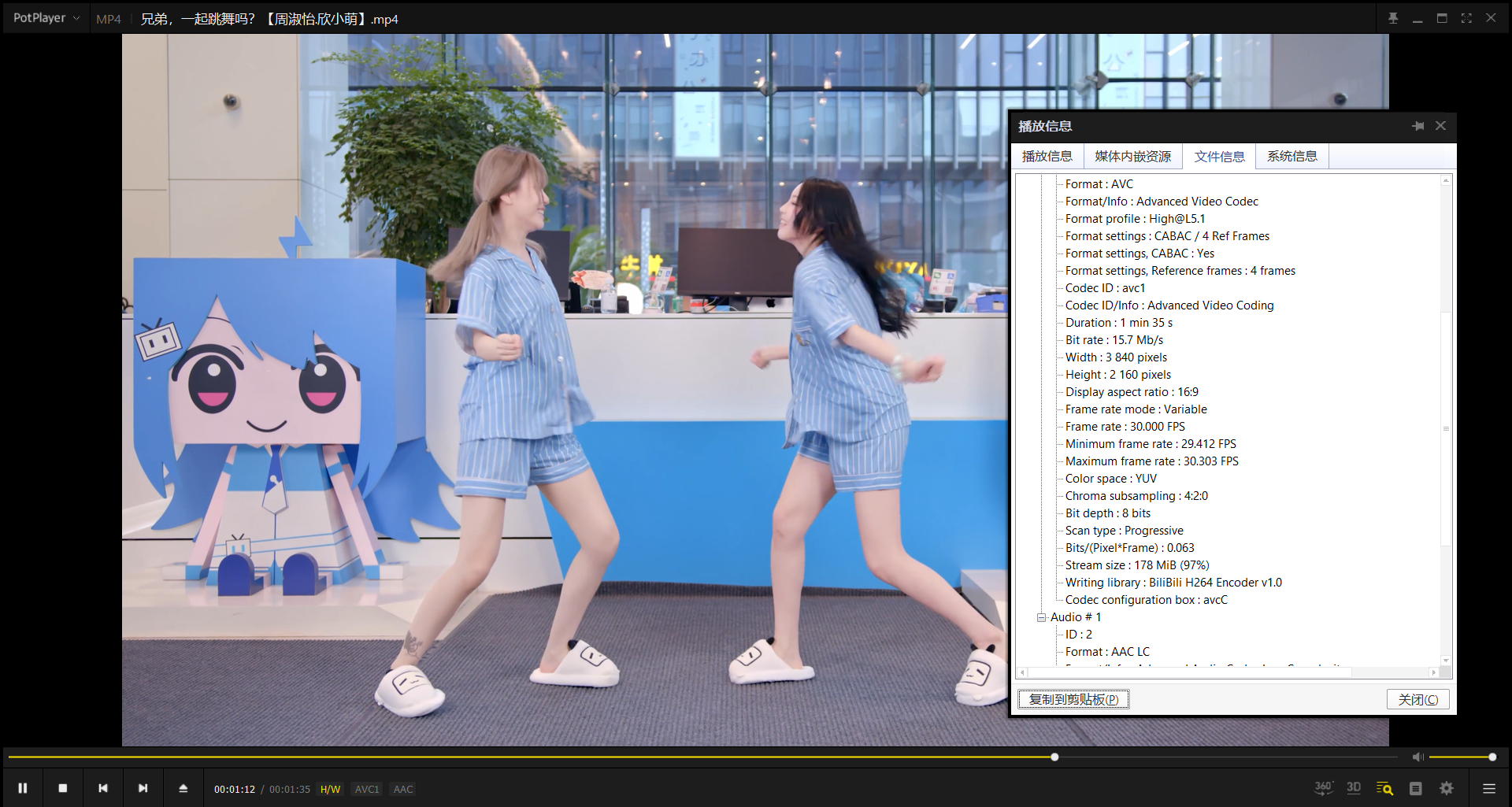
|
||
|
||
# 致谢
|
||
|
||
* https://github.com/codebude/QRCoder
|
||
* https://github.com/icsharpcode/SharpZipLib
|
||
* https://github.com/protocolbuffers/protobuf
|
||
* https://github.com/grpc/grpc
|
||
* https://github.com/dotnet/command-line-api
|
||
* https://github.com/SocialSisterYi/bilibili-API-collect
|
||
* https://github.com/SeeFlowerX/bilibili-grpc-api
|
||
* https://github.com/FFmpeg/FFmpeg
|
||
* https://github.com/gpac/gpac
|
||
* https://github.com/aria2/aria2
|